Designing a Conversational AI Interface for M&A Workflows
How field research in Guatemala led to identifying AI chat as the core product — and designing an AI experience that non-technical analysts trusted with high-stakes deal data.
Disclaimer: All data presented in this case study has been generated for illustrative purposes only and does not represent actual company data.
Company
DeltaGen AI
Role
Founding Product Designer
Timeline
3 months · 2024
Responsibilities
Impact tldr;
Achieved $2M in revenue within 3 months
Reached 72% weekly active usage among analysts
Onboarded 4 enterprise clients post-launch
Founding Product Designer
Leading product discovery and user research
Designing the core conversational AI experience
Collaborating with engineering and ML teams on interaction patterns for LLM behavior
Defining the trust and transparency framework for AI outputs
The Team

Product Designer

CEO

CTO

Product Manager

Project Manager

Software Engineer
Revenue Generated
Revenue achieved within three months of the product's enterprise launch.
Weekly Active Usage
Analysts actively using the platform every week, reflecting strong product-market fit.
Enterprise Clients
Major financial institutions onboarded within the first quarter post-launch.
Time to Launch
From initial discovery to the first enterprise release, shipping at startup speed.
High stakes, outdated workflows
M&A analysts operate in extremely high-pressure environments where decisions involve millions or billions of dollars. A typical analyst workflow involved researching companies, extracting financial metrics, building valuation models, and preparing board presentations — yet much of this work was still manual and fragmented across tools.
Through initial conversations, I identified three recurring issues:
Analyst Burnout
Analysts reported working 70–100 hour weeks during active deals, with much of that time spent on repetitive manual tasks rather than strategic analysis.
Fragmented Tooling
Key tasks required constant switching between:
Manual Data Extraction
Large portions of analyst time were spent extracting data from:
The Opportunity
This created an opportunity for AI to support knowledge extraction and synthesis — designing an AI interface that non-technical analysts could trust while working with sensitive financial data and time-critical decisions.
Understanding real analyst workflows
Rather than relying only on remote interviews, I conducted field research at CMI headquarters in Guatemala.
Analyst Shadowing
12 observation sessions across 2 weeks
Observed analysts performing live deal analysis in their natural working environment.
Diary Studies
Analysts documented their:
Stakeholder Interviews
Interviews with leadership and analysts helped map:

Site study at CMI headquarters

Diary study findings
Analysts ignored dashboards and used chat for everything.
What I built first
Analysts consistently ignored these features
What analysts actually used
One capability replaced multiple features
This insight fundamentally changed the product strategy — the conversational interface became the primary product experience.
Analysts had low trust in AI systems
Despite the potential of conversational AI, research revealed four major concerns that had to be addressed before analysts would adopt the product.
AI Unpredictability
Analysts feared incorrect outputs or hallucinated financial data that could cascade into flawed analyses.
Lack of AI Literacy
Most analysts were familiar with Excel and PowerPoint but had never interacted with LLMs.
Sensitive Data
Deal information is highly confidential and requires traceable sources for every data point surfaced.
High Stakes
An incorrect financial number could impact a board presentation or investment decision worth millions.
The design challenge became
How might I design a conversational AI interface that analysts trust with high-stakes financial information?
Designing beyond the UI layer
AI products require thinking about the entire system — not just screens. Every design decision had to account for model behavior, data flow, and safety constraints.
User
Analyst uploads docs & asks questions
Prompt Interface
Task categories, 1000 char limit, contextual states
LLM Processing
Token management, confidence scoring, model selection
External Data
Bloomberg, PitchBook, uploaded documents
Output UI
Citations, calculations, transparency, feedback
Safety & Fallback Layer
Clarifying questions → External data verification → Structured templates → Persistent disclaimers
The workflow transformation
Before DeltaGen
30–60 minutes per query
After DeltaGen
Instant — queries answered in seconds
Closing the trust gap
The design strategy focused on closing the trust gap between AI capability and analyst confidence. Three principles guided the product design.
Set Honest Expectations
Instead of presenting AI as an authoritative system, we framed it as a co-pilot assisting the analyst. Interface microcopy emphasized collaboration over authority.
Example microcopy
“Let me help you draft the analysis.”
Persistent disclaimer
“DeltaGen AI can make mistakes. Verify important information.”
This framing reduced unrealistic expectations and positioned the AI as a tool analysts control, not one that controls them.
Make Prompting Invisible
Most analysts had no experience writing prompts. Early prototypes revealed users struggled with blank input fields.
Users were presented with a standard chat box.
Observation
Analysts hesitated before typing
Many asked the team “what should I write?”
I introduced example prompts to guide users.
Usage increased but users still struggled with discovery
Prompts were grouped into four task categories based on diary studies:
AI Chat
Financial questions
M&A Output
Reports & summaries
Translation
Spanish ↔ English docs
Excel
Structured financial outputs
This reduced cognitive friction when starting conversations
Designing for Transparency
Trust in AI systems often depends on understanding how answers are generated. Each AI response included extracted financial values, intermediate calculations, and cited sources.
Example output
Extracting values for Fiscal Year 2021
Revenue: $10M
EBITDA: $1.5M
Calculating EBITDA margin:
15%
This transparency allowed analysts to verify the reasoning rather than blindly trusting the output.
Designing around technical limitations
Design decisions were influenced by technical constraints. Understanding LLM limitations was critical to shaping the interface.
Token Limit Constraints
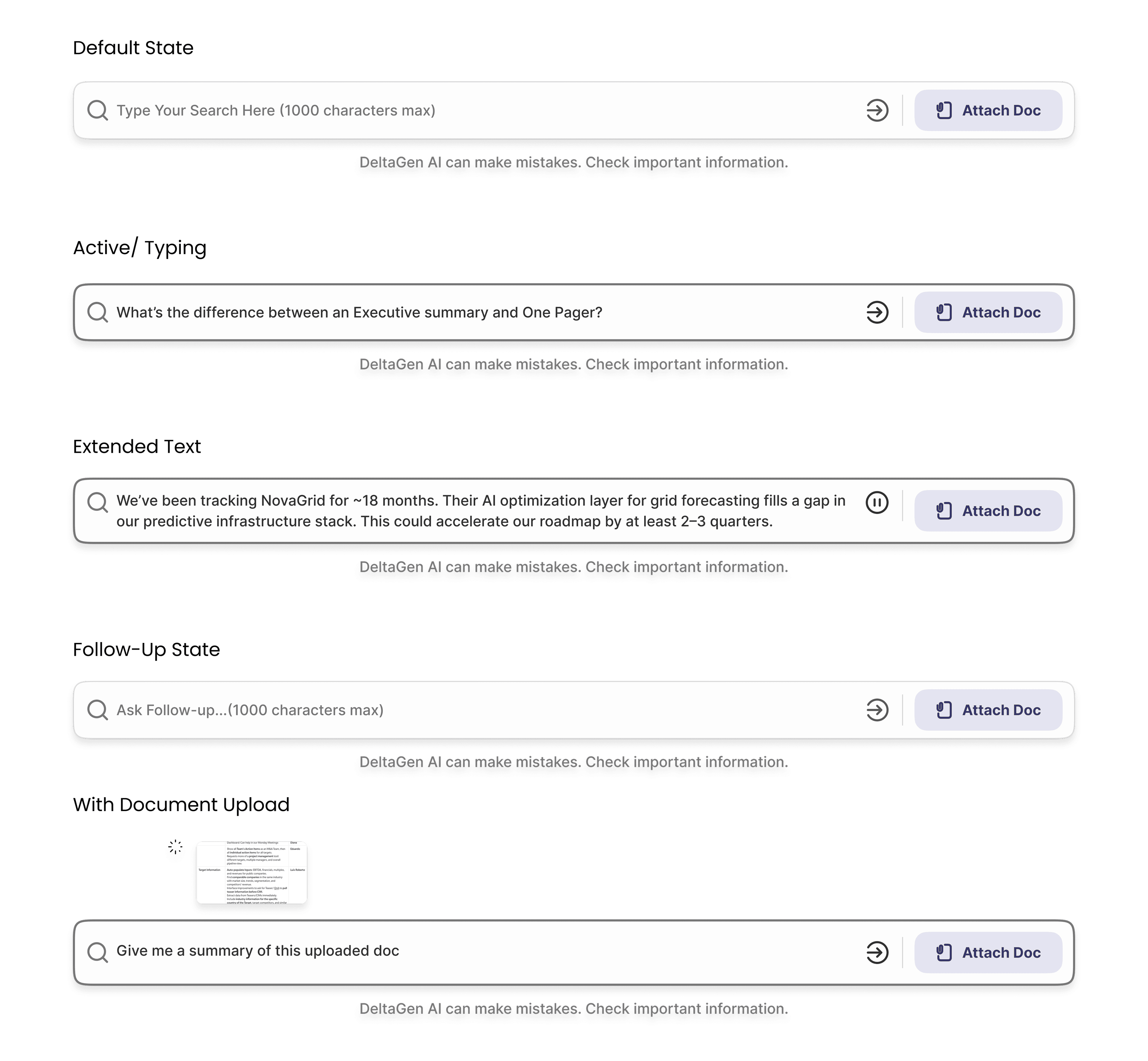
LLM performance degraded with long prompts. To prevent overload, I designed the prompt bar with a 1000 character limit — a design constraint driven directly by engineering requirements.
Prompt bar — 5 contextual states designed around token limit constraints
Latency Constraints
Complex queries could take several seconds. To reduce perceived wait time, I introduced:
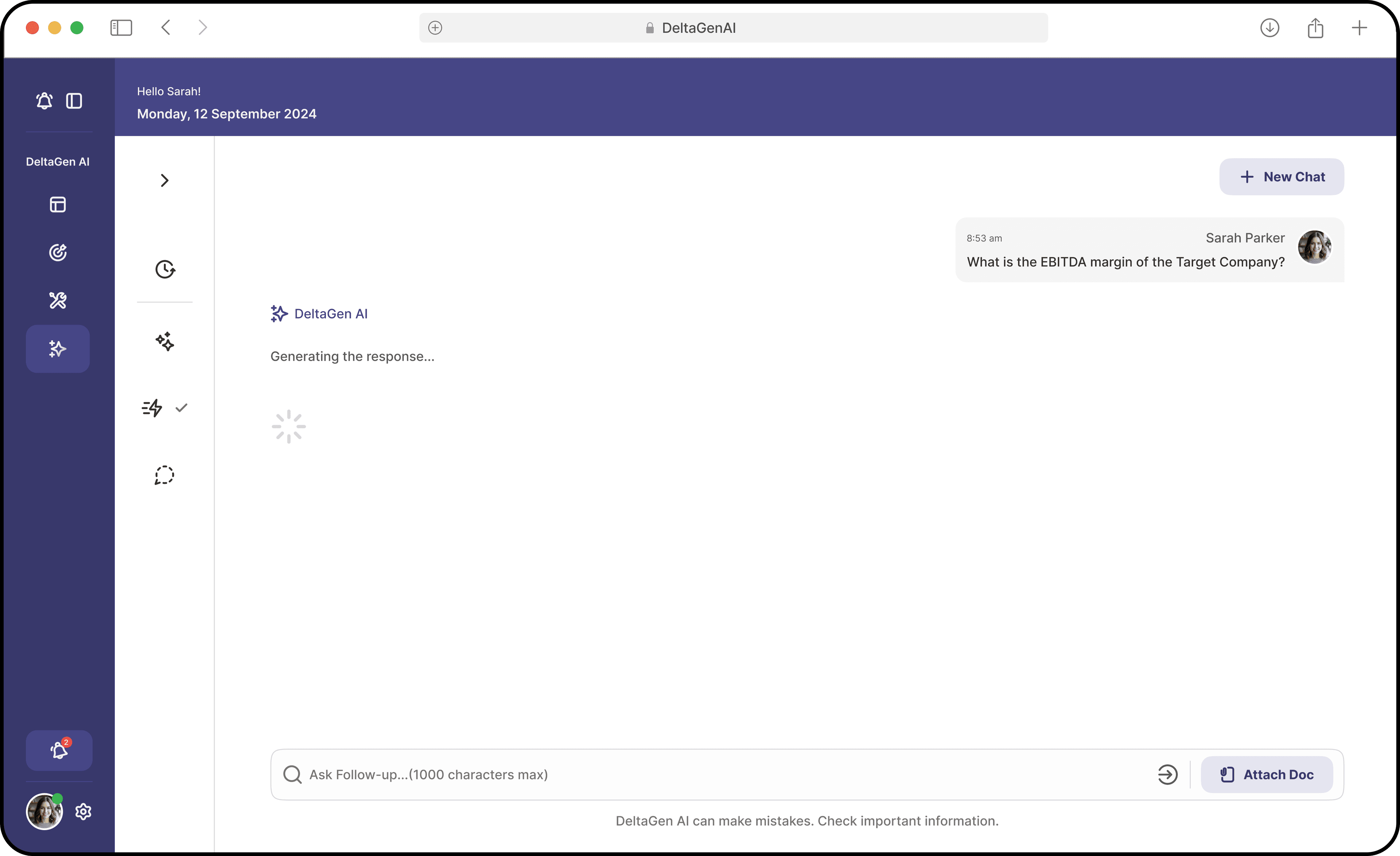
Loading state — “Generating response…”
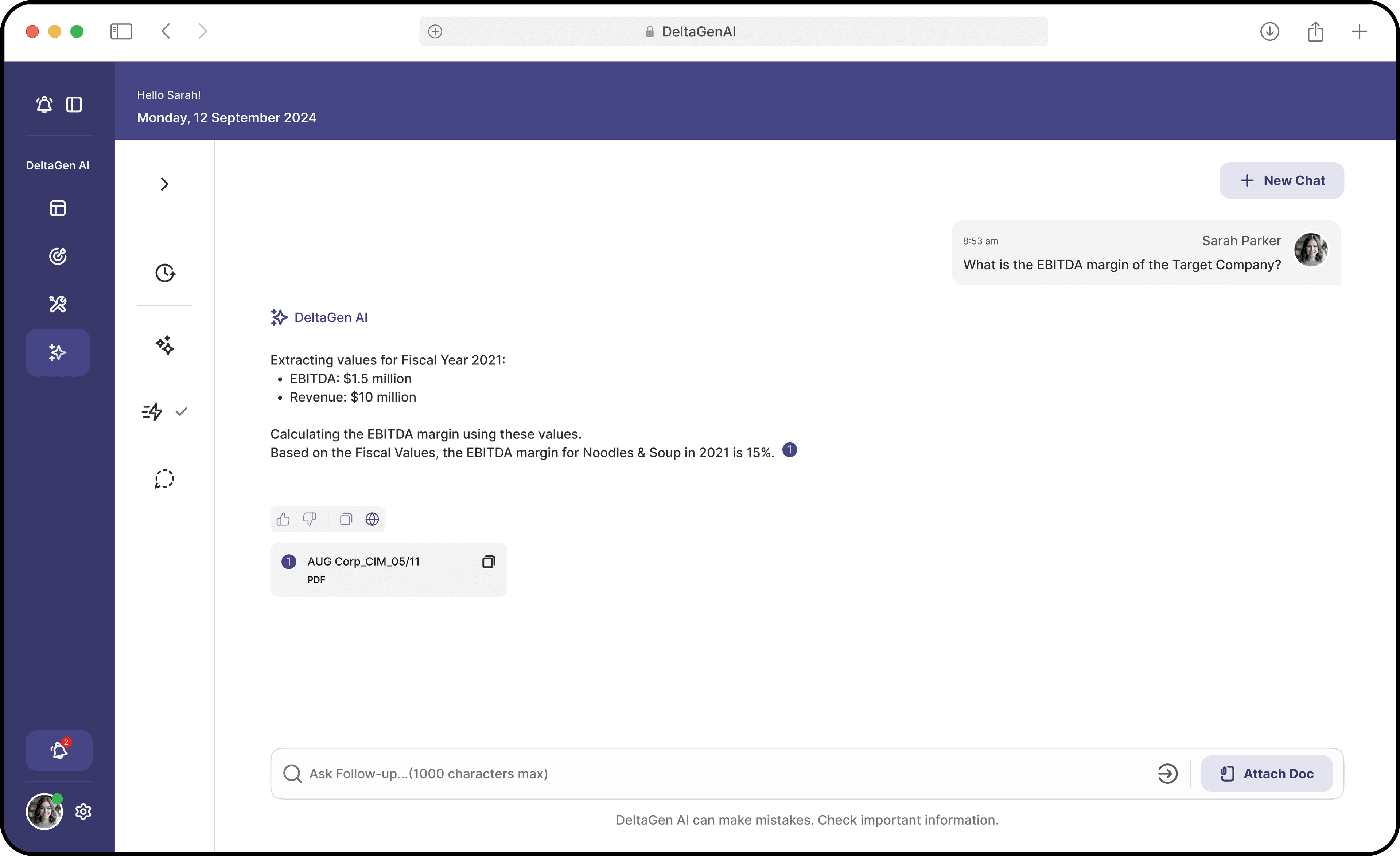
Completed response with calculations & sources
Model Reliability
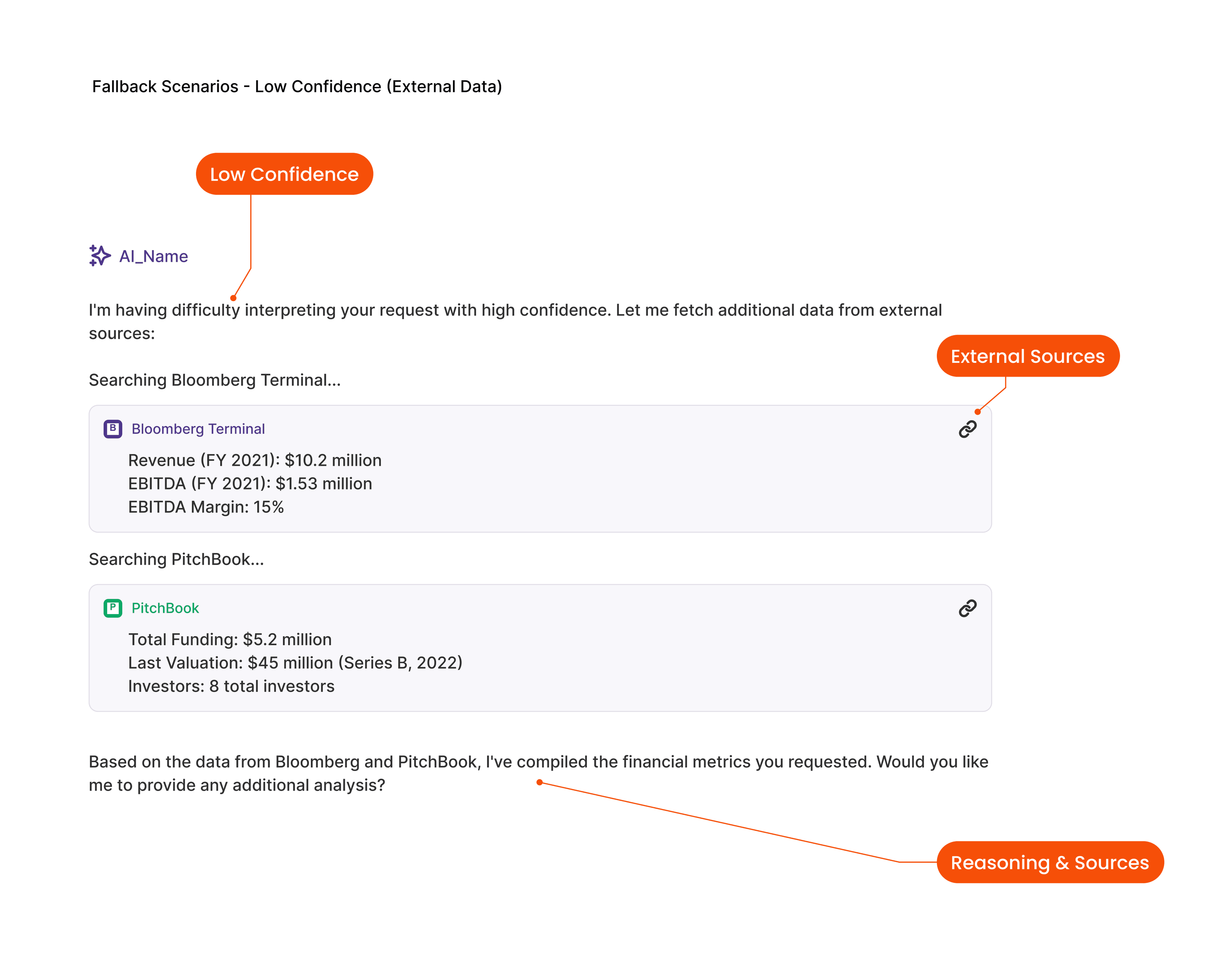
LLM confidence varied depending on query complexity. We designed multi-layer fallback strategies to prevent hallucinated outputs.
Edge Case Design
Anti-HallucinationThree fallback layers ensured safe responses — the system never guesses when it doesn't know.
Clarifying Questions
If the system had low confidence, it asked follow-up questions instead of guessing.
AI response:
“Which fiscal year would you like — FY2021 or FY2022?”
External Data Sources
When confidence remained low, the system pulled verified data from:
Structured Templates
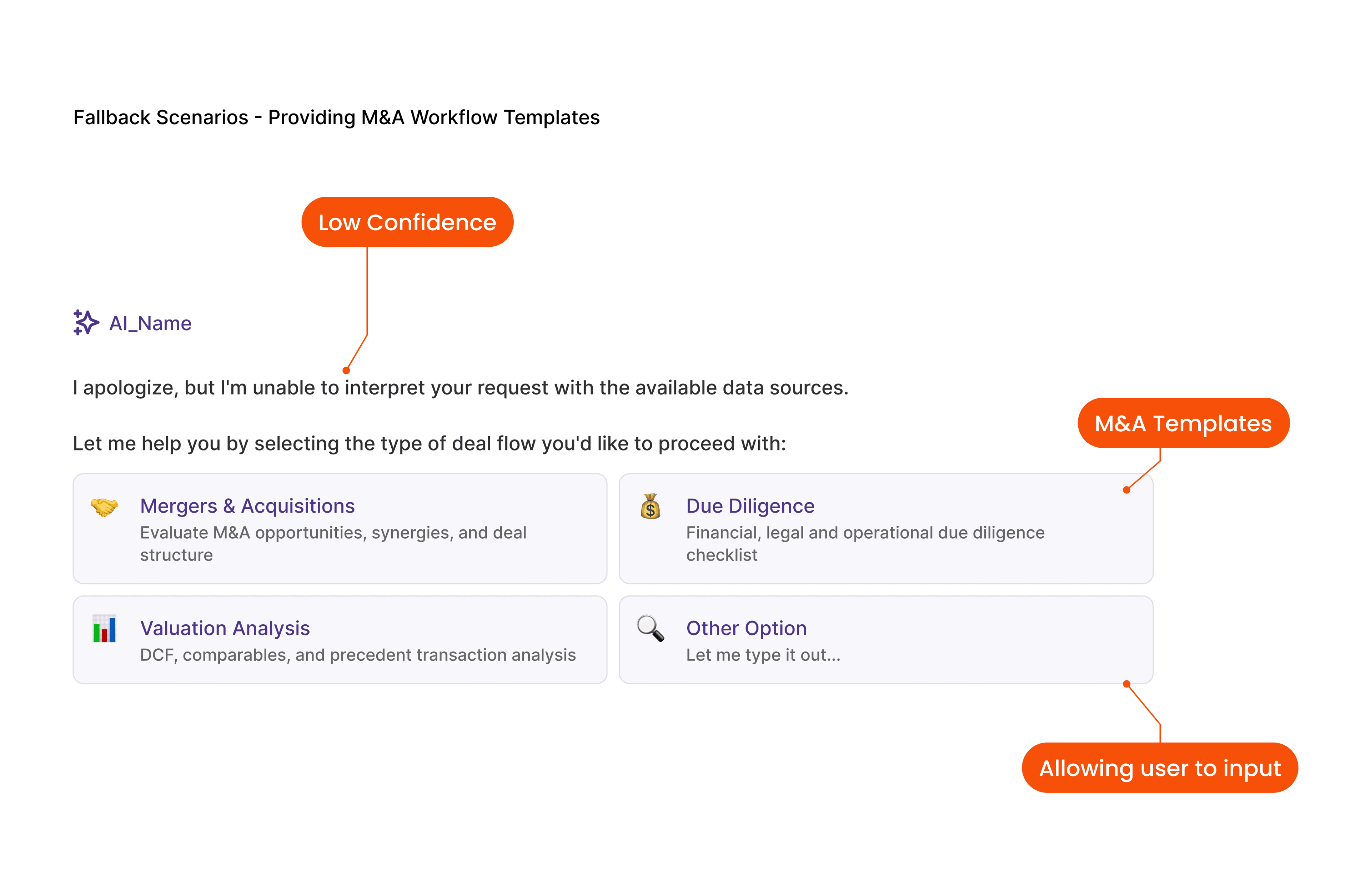
If the system still could not interpret the query, users could choose from structured templates such as:
These guardrails ensured analysts always had a safe path forward.
Measurable impact on analyst productivity
The conversational interface significantly improved analyst productivity across engagement, efficiency, and accuracy.
Design Decision
Task-based prompt categories
Behavior Change
Analysts start conversations without hesitation
Product Impact
2.4x weekly interaction target exceeded
Design Decision
Transparent calculations with citations
Behavior Change
Analysts verify rather than distrust
Product Impact
95% accuracy trust, 100% for uploaded docs
Design Decision
3-layer fallback for low confidence
Behavior Change
Analysts always have a safe path forward
Product Impact
Zero critical hallucination incidents post-launch
Engagement
24+
Interactions per user per week
Target was 10 — the product became part of analysts' daily workflow.
Productivity
50%
Reduction in manual research queries
Analysts spent significantly less time manually extracting data.
Accuracy
95%
Financial data accuracy overall
This reinforced user trust in the system.
What I learned
Field Research Changed the Product
The Guatemala research trip fundamentally reshaped the product direction. Without observing analysts directly, we would likely have continued building complex workflow tools instead of a conversational interface.
AI Interfaces Must Design for Trust
Users rarely trust AI systems by default. Trust must be designed through:
Test the Natural Entry Point Early
If I had tested conversational interaction earlier, I could have avoided building several unused modules. Validating the core interaction pattern first saves significant effort.
My AI Design Philosophy
The best AI interfaces feel less like tools and more like collaborators. Three principles guide my approach:
Design for trust before capability.
Make AI reasoning visible.
Reduce the cognitive burden of prompting.
When these principles are applied well, users stop thinking about the AI system and simply focus on their work.
“Instead of spending hours sourcing, validating, and reading through data, I could get trusted answers instantly — and focus on the story I want to present.”
— Analyst feedback post-launch